Finance Portal SRS documentaion
Finance Portal
Introduction
The Finance portal is an in-house website (or app) that provides a variety of financial data and information relating to the university, all in one place. The portal is a domestic platform under Amrita University, which means that the users, who don’t have an Amrita email id will not be able to see or edit any information on the portal.
Briefing finance portal
Students make payments at our university through different gateways, under different payment categories, and through different modes. The portal allows centralized management of the cash flow within different colleges under Amrita University. All the gateways and payment channels of all the campuses will be linked to the finance portal and the Admin(s) can view and edit this information, of the campus under their dominion.
Process flow chart
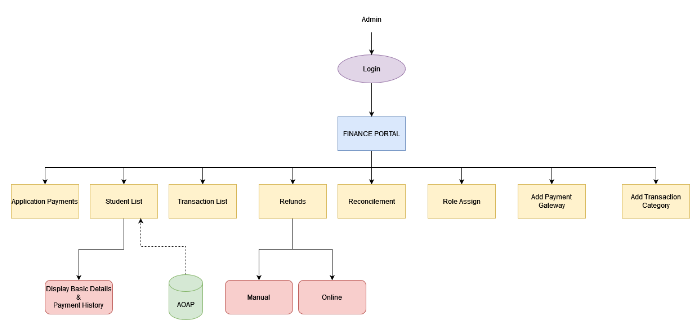
• The Admin can log in to this portal and view/edit the information about students as well as their payment status.
• Admin can access the student list and see the basic details and payment history based on the payment status.
• The transaction list of each payment made by the student can also be viewed by the administrator.
• The reimbursements sought by the students can also be viewed and edited by the admin.
• Refund can be done in two ways: Manual Refund & Online Refund
• The admin can manually initiate refunds for chosen students and obtain their bank account information.
• Online refunds are done through AOAP by selecting the approved status from the withdrawal option, where we can see the Refund table, which is also visible during the manual refund procedure.